Managing History Tab Overload
As we work with clients, we see the same friction points crop up—especially in Rock RMS environments that have been around for a while. As a database grows, so does its complexity. Group structures evolve, workflows and registrations stack up, and reporting becomes more nuanced.
And tucked behind all of that activity is one page that holds an incredible amount of value when you’re troubleshooting issues or trying to get a quick snapshot of someone’s story: the History tab.
Do you remember the sound of a file cabinet drawer opening—the metallic slide, the gentle thunk when it reached the end? The way you’d rifle through folders, pull one out, spread it across a desk, and dig through aging, faded papers to find receipts, signatures, or records? That filing cabinet worked hard, but some folders always ended up thicker than others. Sometimes the drawer even stuck a little—not because anything was wrong, but because it was carrying too much. Long before databases, this is how we managed history.
Today, the History tab is your digital filing cabinet. It stores communications, attendance, giving, demographic changes, and more. And just like those bulging paper folders, some profiles accumulate a staggering amount of information over time.
Eventually, all that digital “paper” has to be loaded at once—and that’s when the page can slow down, struggle to load, or time out entirely.
The good news? This is a solvable problem. Over the years, we’ve learned a few best practices that can help keep the History tab responsive, intentional, and easier to navigate. The History tab is meant to support you—not slow you down. With a few strategic adjustments, you can lighten the load and help it do exactly that.
In this article, we’ll walk through why the History tab slows down and what you can do—short term and long term—to keep it working for you.
What Slows the History Tab Down
The heaviest load on the History tab typically comes from the Communication History and Person History blocks. These two blocks tend to grow the fastest and contain the most records over time. Communications alone can number in the hundreds—or thousands—especially for staff members or highly engaged individuals. Person History adds another layer, logging every demographic change, and other system-level events.
Individually, these records are valuable. Collectively, they can become overwhelming. When both blocks attempt to load years’ worth of data at once, the History tab can struggle—sometimes slowing noticeably, other times failing to load entirely. Understanding that these two blocks are the primary contributors helps you focus your efforts where they’ll have the biggest impact.
Quick Wins
Both the History tab and the Person History block include filter options, and setting a date range is the fastest way to improve load times. Limiting results to a recent window, such as the last 6 or 12 months, dramatically reduces the amount of data the page must retrieve. For most day-to-day use, troubleshooting, or reviewing recent activity, this is usually sufficient.
The upside of this approach is speed and simplicity. No configuration changes are required, and the improvement is immediate. The downside, however, is that these filters are user-specific, not global. Your Rock admin team can’t enforce them for everyone. Each staff member has to apply and manage their own filters.
This also introduces a human factor. It’s easy to forget a filter is applied and assume a communication or record doesn’t exist—when it’s simply outside the selected date range. Filters are best thought of as a short-term or situational fix, not a long-term strategy.
For organizations planning to upgrade, it's worth noting that Rock v18 includes performance enhancements to the Communication History block. Upgrading may offer improved load times for systems with heavy communication history. If history performance has been a recurring pain point, this is another reason to evaluate an upgrade as part of your optimization strategy. For a broader overview of what's new in v18, you can watch the Rock RMS release video here.
Improving Usability
Some clients choose to reorganize the History tab using an accordion-style layout. This doesn’t reduce the amount of data being loaded, so it won’t improve performance—but it can dramatically improve usability. By collapsing sections, staff can quickly focus on the block they care about without scrolling past pages of unrelated history.
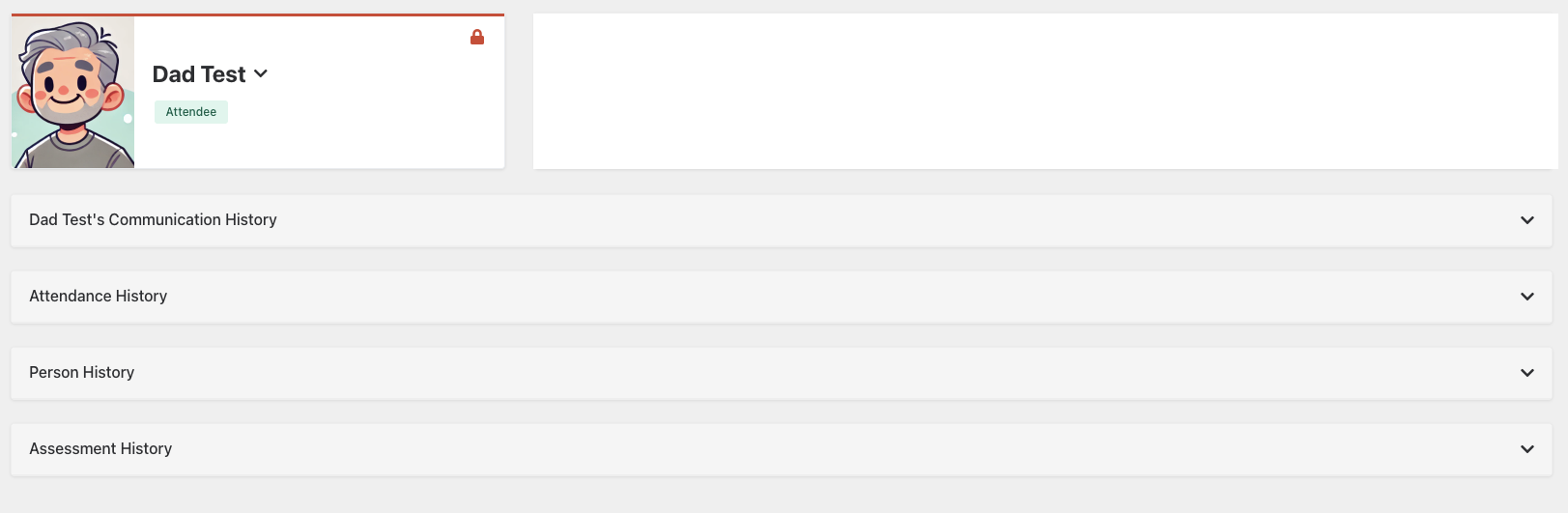
This approach is especially helpful when searching for something specific, like an attendance record or a single demographic change, but the Communication History dominates the screen. Combined with staff training around filters, accordion layouts can make the History tab feel far less overwhelming, even if the underlying data volume remains the same.
Think of this option as improving navigation, not performance. It’s about making the page easier to work with once it loads.
Separating History
Another effective option is to move Communication History to its own tab. This is often a great middle ground between quick fixes and long-term cleanup. By separating high-volume data from the rest of the History tab, you reduce visual clutter and give each page a clearer purpose.
This change is also low effort. History blocks can be removed from one tab and added to another in minutes. For many teams, this simple separation makes day-to-day work significantly smoother—especially for staff who rarely need to review years of communication history but frequently check attendance or demographic changes.
Best Practices
Beyond layout changes, one of the most impactful steps you can take is being intentional about what gets saved to Communication History in the first place. Not every message needs to live forever on a person’s profile.
Workflows are a common culprit. Notifications related to room approvals, connection assignments, or internal alerts can quietly add hundreds of records—especially for staff members involved in many processes. Each time you configure a workflow to send a communication, pause and ask: Do we actually need this recorded in person history long-term?
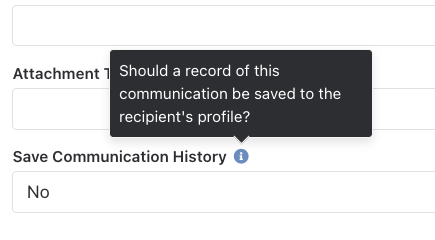
A common approach is to save workflow communications during testing, then disable that option once the workflow is live. Being conservative here pays off over time. The fewer low-value communications you store, the lighter and more useful the History tab becomes.
Long-Term Maintenance
For long-term health, automation makes the biggest difference. Some of our clients use scheduled jobs that run nightly to remove Communication History or Person History records older than a defined threshold—often 12 or 18 months. You choose the retention window based on your ministry needs and reporting requirements.
This approach doesn’t just improve the History tab. It reduces database bloat overall, which can improve performance across the system. Pages load faster, queries run more efficiently, and staff spend less time waiting and more time working.
Think of this as routine maintenance—like purging old files from a storage room. The goal isn’t to erase valuable history, but to keep your system healthy, responsive, and sustainable as your database continues to grow.
Common History Tab Mistakes
- Relying on filters as a permanent fix and forgetting they are user-specific.
- Saving every workflow-generated communication without considering long-term value.
- Allowing years of low-value history to accumulate.
Where to Start
If you're not sure which approach to tackle first, start with the least invasive option and work your way up. You don't need to do everything at once.
If profiles are timing out right now
Start with filters. Limiting the date range on Communication History and Person History blocks is the fastest way to restore usability while you plan next steps.
If pages load but feel overwhelming
Focus on usability improvements. Accordion-style layouts or separating Communication History into its own tab can dramatically improve the staff experience without changing any underlying data.
If Staff profiles are especially slow
Review workflow-generated communications. These tend to accumulate quickly and often provide the biggest opportunity for reducing noise.
If your database has years of history
Consider automated cleanup jobs. This is the most effective long-term solution and benefits your entire system, not just the History tab.
The key is progress, not perfection. Even one small change can make the History tab noticeably more responsive. The History tab should tell a story—not slow you down. With a little intentional design and ongoing maintenance, you can keep that story clear, useful, and easy to access for years to come.
If you’d like help implementing any of these ideas—or want a second set of eyes on your History tab—start a conversation with us by clicking the Contact Us button below. We’re always happy to help you think through the best approach for your database.
Follow us on social media to stay inspired, stay connected, and be the first to see what’s coming next.
Looking Ahead
Next week: When it's Game Time, Who’s on Your Sideline?
We’ll take a deeper look at why having the right support team makes all the difference in your Rock environment. Whether you’re already a 9 Embers client or just curious about what that partnership could mean, we’ll walk through the strategic, practical, and confidence-boosting benefits of having a trusted guide on your sideline.
About the Author
A published author with more than 15 years in church ministry, Tina D. Stephens serves as Ministry Analyst & Content Writer at 9 Embers, crafting clear, practical content to help ministries use Rock RMS well.